Practical guide
How to Apply AI to Every Row in a CSV
A practical, test-first workflow for enriching, classifying, summarizing, or transforming every row in a CSV with an AI model.
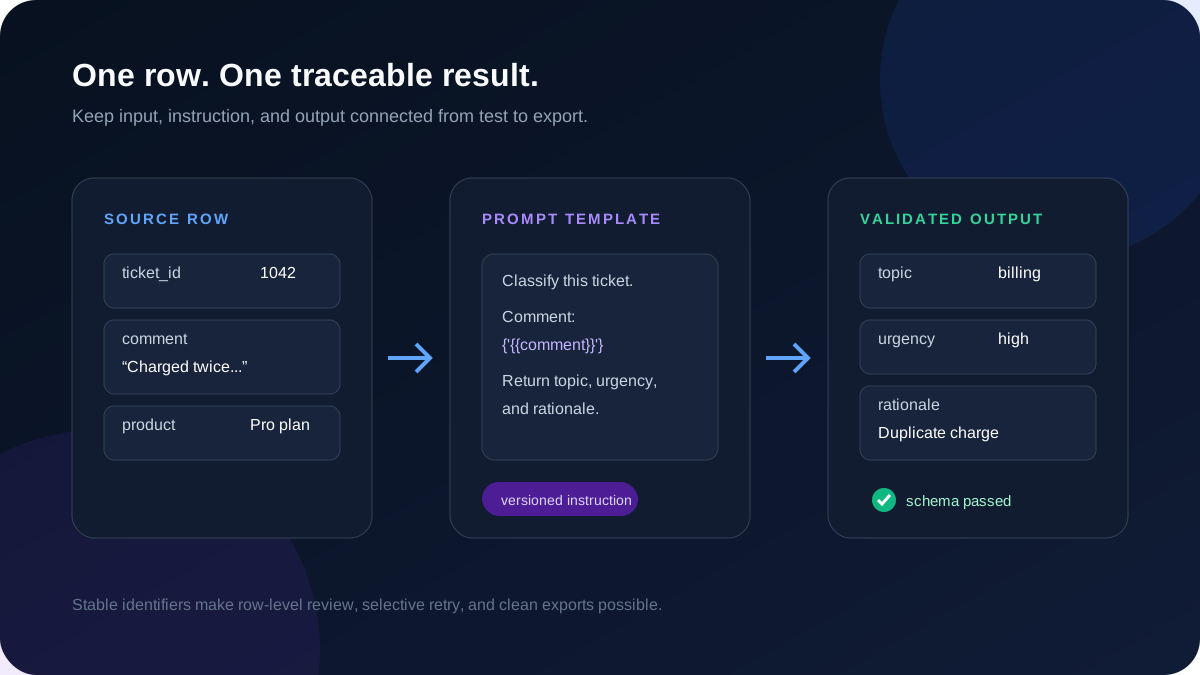
Applying AI to a spreadsheet sounds simple: read a row, send a prompt, save the response. The difficulty appears when the file contains hundreds or thousands of rows. A vague prompt can create inconsistent output, one malformed row can stop a script, and a small per-row cost can become an expensive full run.
A safer workflow treats the spreadsheet as a batch job with an explicit input contract, representative testing, structured outputs, cost review, and row-level recovery. This guide explains that process without tying it to a specific model provider.
1. Decide what one row should become
Start with a single business outcome. Useful batch tasks include classifying support tickets, extracting attributes from product descriptions, standardizing messy text, drafting personalized summaries, or tagging records for review. Avoid asking one prompt to perform several unrelated jobs unless the output schema makes each result explicit.
Write down the source columns the model may use and the output columns it must return. If a task uses a customer comment and product name, for example, the output might contain sentiment, topic, urgency, and a short rationale. Clear boundaries make the job easier to test and easier to audit later.
2. Prepare the CSV before calling a model
Good input hygiene is not cosmetic. It prevents variables from mapping to the wrong values and makes failed rows reproducible. A stable row identifier is especially important because row numbers can change when a file is sorted or filtered.
- Keep one record per row and use a stable identifier such as ticket_id or product_sku.
- Use descriptive, unique column names and a consistent text encoding such as UTF-8.
- Remove columns the model does not need, especially secrets or unnecessary personal data.
- Decide how blank values, duplicate records, and unusually long cells should be handled.
- Preserve the original file so generated output can always be traced back to its source.
3. Build a prompt template around column variables
A batch prompt is a template. Static instructions define the task, while variables insert values from the current row. The instruction should say what evidence the model may use, how to handle missing information, and what output format is required.
For classification, define the allowed labels instead of asking for an open-ended category. For extraction, tell the model to return null when a value is not present rather than guessing. For writing tasks, specify the audience, length, and facts that must not be invented.
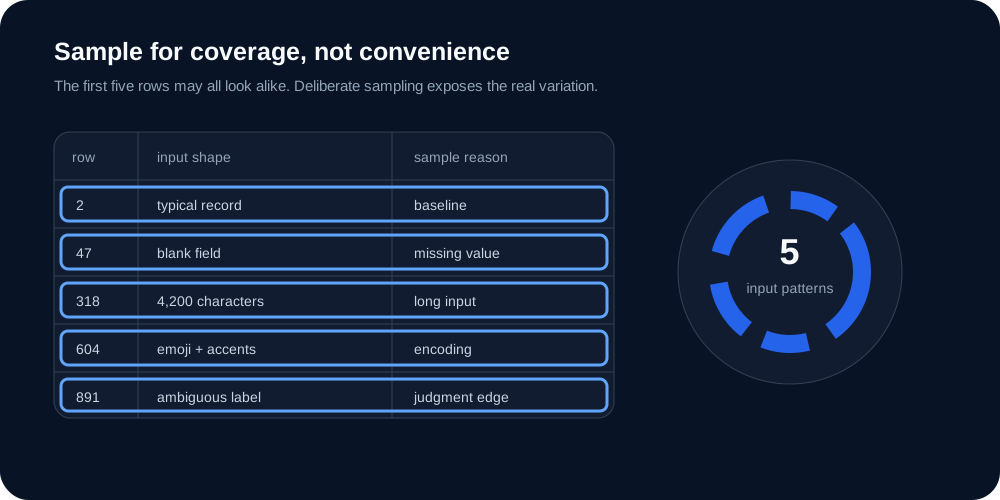
4. Test representative rows, not just the first rows
The top of a spreadsheet is rarely a reliable sample. Test a small set that includes normal records, blanks, long text, unusual characters, ambiguous examples, and rows near your expected size limits. Representative testing exposes failure modes before they are multiplied across the file.
Review the rendered prompt, model output, latency, token use, and estimated cost together. If the output will feed another system, validate its structure as well as its meaning. A response can read well and still be unusable because a field name or data type is wrong.
5. Approve the full run with recovery in mind
Before processing every row, confirm the selected model, row count, expected output fields, and cost range. During the run, track completed, failed, and pending rows separately. Failures should preserve enough context to explain what happened without forcing successful rows to run again.
After completion, inspect a second sample across the finished output. Export both the generated fields and the stable source identifier. If a subset failed, retry only eligible failed rows and keep a record of which prompt and model configuration produced each result.
When a no-code batch tool is the better fit
A custom script can be appropriate when engineers own the workflow, the schema is stable, and observability already exists. A batch interface is usually easier when operations or content teams need to change prompts, compare test outputs, review cost, recover individual rows, or repeat the workflow with new files.
BatchForge is being built around that test-first path: upload CSV or JSON data, map variables, test representative rows, inspect output and cost, then approve the full run. Design-partner access is currently reviewed rather than automatically granted.
Frequently asked questions
Can an AI model process a CSV file directly?
A CSV normally needs to be parsed into rows first. Each row is then inserted into a prompt template, sent to a model, validated, and joined back to the source record for export.
How many rows should I test before a full run?
There is no universal number. Use a small representative sample that covers normal rows and known edge cases. The goal is coverage of input variation, not simply testing the first few records.
How do I keep batch AI output consistent?
Define allowed values and data types, request structured output, test edge cases, and reject or retry responses that do not satisfy the output contract.